
Most ecommerce advertisers arrive at Google Shopping the same way: they activate a campaign, upload the Merchant Center feed, and wait. When results fall short, they look for the problem in the budget or the bids. They rarely look where it actually is: in the structure.
A poor Shopping structure does not just waste budget. It prevents the algorithm from learning, mixes profitable products with unprofitable ones, and leaves you with no visibility into what is working and what is not.
This guide explains how to structure your Shopping campaigns in 2026, with the strategic logic behind each decision.
Contents
- The two types of Shopping campaign in 2026
- How to structure a Standard Shopping campaign
- Recommended structure by catalogue size
- Bidding strategy: when to use each option
- The hybrid strategy: PMax + Standard Shopping in parallel
- The Merchant Center feed: the foundation of everything
- Most common structure mistakes
- Pre-launch checklist
The two types of Shopping campaign in 2026
Before discussing structure, you need to understand what you are working with.
Standard Shopping
The traditional Shopping campaign. You control the structure, bids, campaign priorities, and negatives. Google decides which searches trigger your ads within the parameters you define.
Advantages: Granular control, transparent reporting, ideal for specific situations. Disadvantages: More manual management required, no access to channels such as YouTube or Gmail.
Performance Max with feed
Technically not a “Shopping campaign”, but it functions as one for ecommerce: it uses your Merchant Center feed to show product ads across Shopping, Search, YouTube, Display, Discover, Gmail, and Maps simultaneously.
Advantages: Greater reach, automatic optimisation, access to all Google channels. Disadvantages: Less control, less detailed reporting, requires a minimum conversion volume to work well.
In 2026, the question is not “Standard Shopping or Performance Max?” but how do I use both together intelligently?
How to structure a Standard Shopping campaign
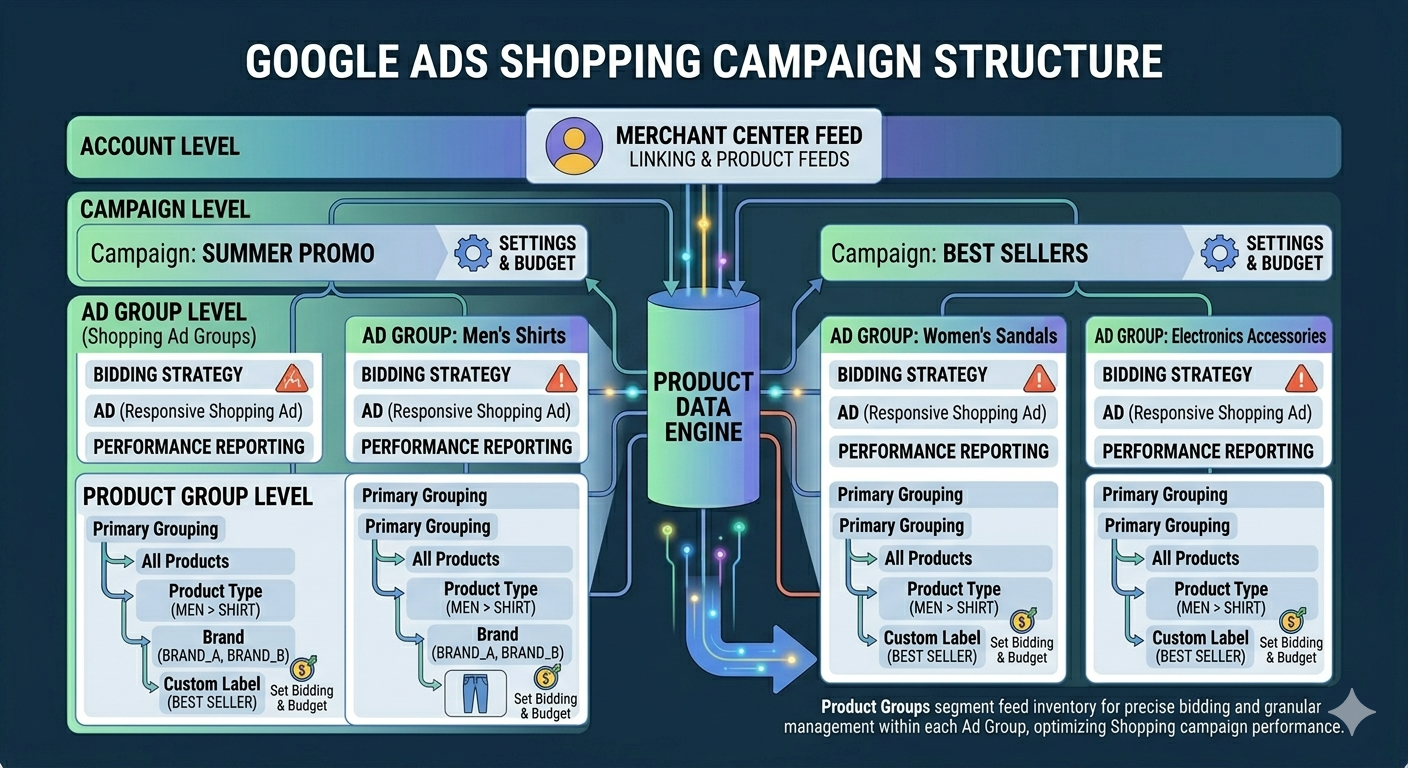
Level 1: The campaign
At campaign level you define the general parameters: conversion objective, bidding strategy, daily budget, campaign priority (low, medium, or high — important when you have multiple active Shopping campaigns with overlapping products), and locations.
Level 2: Ad groups
Ad groups in Shopping do not work like those in Search. Here you do not define keywords — you define product groups. Their main function is to group products you want to manage with the same base bid. The general recommendation is to start with one ad group per campaign and handle segmentation at the product group level.
Level 3: Product groups
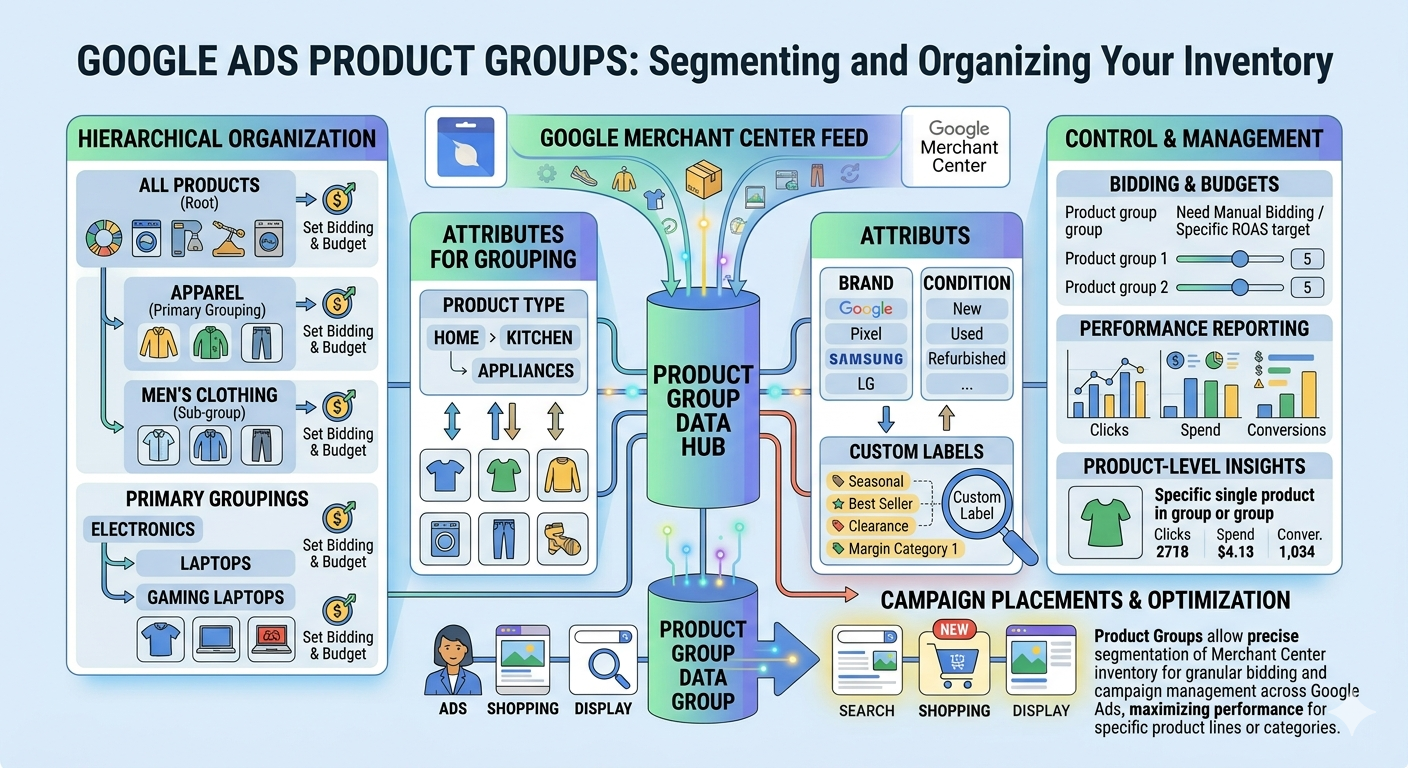
This is where real segmentation happens. Google lets you subdivide products using these feed attributes:
| Attribute | When to use it |
|---|---|
| Category (google_product_category) | To divide by product type |
| Brand | To manage different bids by brand |
| Product ID | To bid individually per product |
| Product type | To use your own taxonomy |
| Custom labels | The most flexible option |
Custom labels: the key to intelligent structures
Custom labels (custom_label_0 through custom_label_4) are attributes you define yourself in the feed. Google does not use them to classify your products — you use them to segment however you like. You can consult the official Merchant Center feed attributes documentation to see all available attributes.
This makes custom labels the most powerful structuring tool in Shopping, because they let you create categories that do not exist in Google’s taxonomy.
Usage examples:
- custom_label_0 → Margin: high_margin / low_margin / no_margin
- custom_label_1 → Season: spring / summer / sale / evergreen
- custom_label_2 → Performance: bestseller / new / underperformer
- custom_label_3 → Price: under_30 / 30_to_100 / over_100
- custom_label_4 → Clearance: yes / no
With these labels you can build structures such as: Campaign A with a high ROAS target for high-margin bestsellers, Campaign B with a moderate ROAS target for new products in the learning phase, and Campaign C for clearance stock with aggressive manual CPC.
Recommended structure by catalogue size
Small catalogues (fewer than 100 products)
Main Shopping Campaign
- Ad group: All products
- Product group: Category A → bid X
- Product group: Category B → bid Y
- Product group: Everything else → low bid
Simple, manageable, sufficient to get started. Add brand negatives from day one.
Medium catalogues (100–1,000 products)
- Campaign 1: Bestsellers — high ROAS target
- Campaign 2: General catalogue — standard ROAS target
- Campaign 3: Clearance — aggressive manual CPC
Large catalogues (more than 1,000 products)
At this scale, manually managing Standard Shopping becomes very heavy. This is where PMax starts to make more sense as the primary campaign, with Standard Shopping covering specific cases:
- Performance Max: full catalogue, segmented by asset group and category
- Standard Shopping — Brand: manual CPC, high priority
- Standard Shopping — High margin: precise ROAS target
- Standard Shopping — Clearance: defined dates
Bidding strategy: when to use each option
| Strategy | When to use it |
|---|---|
| Manual CPC | Limited conversion history or need for full control. Ideal for brand or clearance campaigns. |
| Maximise clicks | New campaigns or products without data. A starting point, not a permanent strategy. |
| Target ROAS | With at least 30–50 conversions/month and a profitability objective. The most recommended for ecommerce accounts with history. |
| Maximise conversion value | Similar to tROAS but without a minimum profitability constraint. Useful for scaling during high-demand periods. |
Do not activate target ROAS until you have at least 30–50 conversions per month in that campaign. With less data, the algorithm restricts bids so severely that it cannot gather enough traffic to learn. This recommendation is documented in Google’s official Smart Bidding guide.
The hybrid strategy: PMax + Standard Shopping in parallel
Since late 2024, PMax and Standard Shopping compete on equal footing in the auction. The principle is straightforward: use PMax for scale and Standard Shopping for control in specific situations.
The 4 situations where Standard Shopping outperforms PMax
Brand searches — PMax tends to bid aggressively on searches for your own brand, where CPC is higher than necessary. A Standard Shopping campaign with manual CPC and high priority captures those searches at a more efficient cost.
Low-margin products — The PMax algorithm optimises towards conversions, not margin. If you have products with a 5–10% margin, PMax can spend on them as enthusiastically as on 40% margin products. Standard Shopping with a very high ROAS target lets you limit that spend.
“Zombie” products — In large catalogues, PMax concentrates budget on products it already knows convert, ignoring new or slow-moving products. A Standard Shopping campaign with Maximise clicks can generate the first performance data.
Stock clearance — When you need to move inventory within a defined time window, PMax lacks the urgency you need. A Standard Shopping campaign with aggressive manual bids and set dates acts with more speed.
How to prevent the campaigns competing against each other
Use product exclusion lists to clearly segment what goes to PMax and what goes to Standard Shopping. Apply negatives at account level — since 2024 these also affect PMax. And review the overlap report that Google Ads generates when two campaigns compete for the same products.
The Merchant Center feed: the foundation of everything
It does not matter how well you structure your campaigns if the feed has problems. The attributes with the greatest impact on performance:
Title — Include brand, product type, and key attributes such as colour, size, or material. The title is your “keyword” in Shopping. Avoid generic titles.
Description — Add relevant information that complements the title. The algorithm uses it for search matching.
Images — High resolution (minimum 800×800px), white or neutral background for most categories.
Price — Must be updated in real time. Discrepancies between the feed and the website cause product disapprovals.
GTIN/EAN — Mandatory for branded products. Significantly improves eligibility in auctions.
You can review your feed status directly in Google Merchant Center and resolve critical errors before launching.
Most common structure mistakes
Putting all products in “Everything else” — If you do not segment product groups, every product gets the same bid regardless of margin or performance.
Using only Google’s category as segmentation — Google’s taxonomy is generic. Your business has its own logic — use custom labels to capture it.
Activating target ROAS from day one — Without sufficient history, tROAS freezes the campaign. Start with Maximise clicks or manual CPC for 4–6 weeks.
Not adding negative keywords from the start — Without negatives, you appear in non-converting searches and pay for them. From day one, add terms such as “free”, “second hand”, or irrelevant competitors.
Mixing seasonal products with evergreen products — A seasonal product at peak can consume the entire budget, leaving evergreen products without visibility. Keep them in separate campaigns.
Pre-launch checklist
Merchant Center feed
- All products approved, zero disapprovals for critical errors
- Titles with brand + product type + key attributes
- GTINs/EANs added where applicable
- Custom labels configured (at minimum margin and product type)
- Prices updated and consistent with the website
Campaign structure
- Segmentation by product groups — nothing left in “Everything else”
- Separate group for high-margin products
- Brand campaign configured if PMax is active
- Campaign priorities defined if products overlap
Bids and budget
- Bidding strategy appropriate to available conversion volume
- Budget sufficient to exit the learning phase
- ROAS target calibrated against real historical data, not an aspirational figure
Negatives
- Generic negative list added from day one
- Search terms review scheduled — at minimum weekly for the first 4 weeks
Conclusion
A good Shopping structure is not a technical detail — it is the difference between an account that scales profitably and one that consumes budget without clear results.
The logic is always the same: give the algorithm the information it needs to make good decisions, and keep manual control where automation cannot see what you can see — margins, seasonality, business strategy.
If you would like to review how your account is currently structured, get in touch for a full review.
Related articles: